> ## Documentation Index
> Fetch the complete documentation index at: https://docs-dev-fix-nav-assets.mintlify.site/llms.txt
> Use this file to discover all available pages before exploring further.

> Learn how to configure an update policy form using Forms for Actions for users to review and accept new terms of service or consent updates.

# Use Cases: Configure an update policy form using Forms

<Card title="Before you start">
  1. Create a [Machine-to-Machine Application](/docs/get-started/auth0-overview/create-applications/machine-to-machine-apps) with the following scopes enabled:

  * `read:users`
  * `update:users`
  * `create:users`
  * `read:users_app_metadata`
  * `update:users_app_metadata`
  * `create:users_app_metadata`

  2. Add a [Vault connection](/docs/customize/forms/vault) using the M2M application credentials.
</Card>

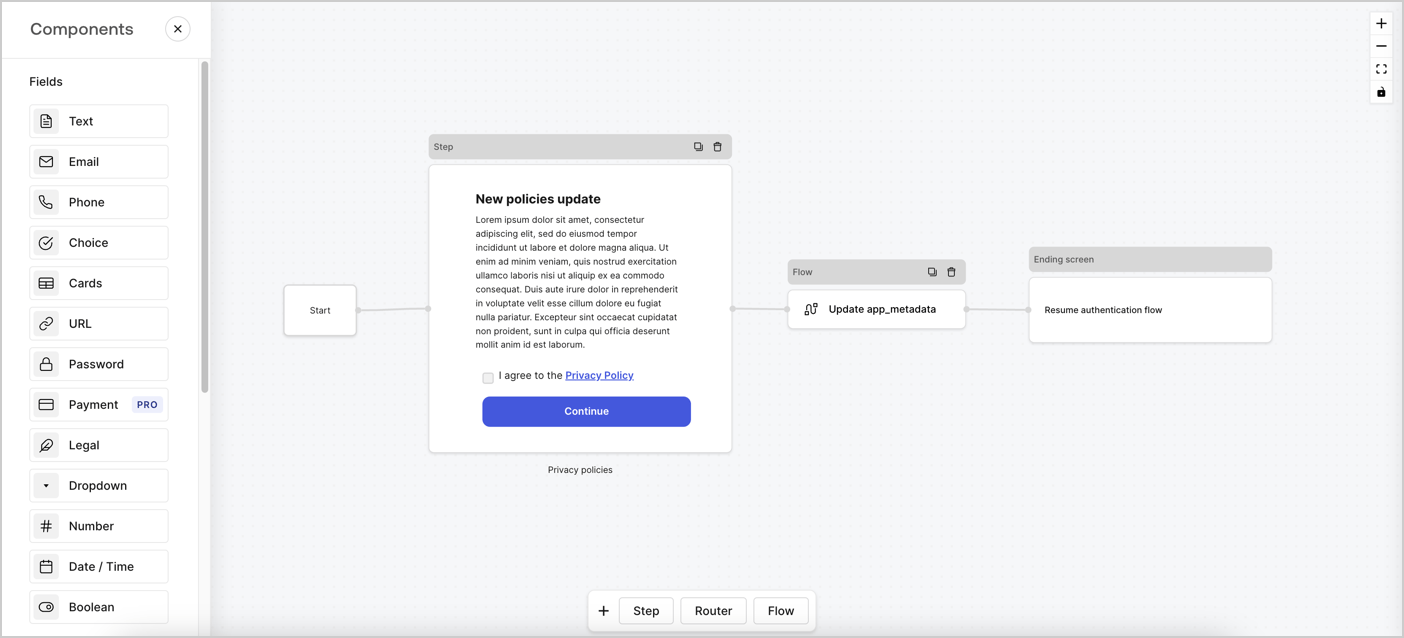
Forms for Actions allows you to create custom privacy policies flows and store the consent under the `app_metadata` object.
<Frame>
  <img src="https://mintcdn.com/docs-dev-fix-nav-assets/q5Ii4EO0SSVoOxXV/docs/images/cdy7uua7fh8z/6i68dMvHDTijfRmSgN1x8Q/ad900e7d4c0fb34645921435472b8684/privavy-policy-form.png?fit=max&auto=format&n=q5Ii4EO0SSVoOxXV&q=85&s=e2f3c1074e4bbd0826142c5366c8b2ae" alt="Dashboard > Actions > Forms > Privacy policy use case" data-og-width="1404" width="1404" data-og-height="638" height="638" data-path="docs/images/cdy7uua7fh8z/6i68dMvHDTijfRmSgN1x8Q/ad900e7d4c0fb34645921435472b8684/privavy-policy-form.png" data-optimize="true" data-opv="3" srcset="https://mintcdn.com/docs-dev-fix-nav-assets/q5Ii4EO0SSVoOxXV/docs/images/cdy7uua7fh8z/6i68dMvHDTijfRmSgN1x8Q/ad900e7d4c0fb34645921435472b8684/privavy-policy-form.png?w=280&fit=max&auto=format&n=q5Ii4EO0SSVoOxXV&q=85&s=3fd3e7e9bfbae91552e2cfab795c074f 280w, https://mintcdn.com/docs-dev-fix-nav-assets/q5Ii4EO0SSVoOxXV/docs/images/cdy7uua7fh8z/6i68dMvHDTijfRmSgN1x8Q/ad900e7d4c0fb34645921435472b8684/privavy-policy-form.png?w=560&fit=max&auto=format&n=q5Ii4EO0SSVoOxXV&q=85&s=8321067728b5ac7dfafbf65049c8ca5d 560w, https://mintcdn.com/docs-dev-fix-nav-assets/q5Ii4EO0SSVoOxXV/docs/images/cdy7uua7fh8z/6i68dMvHDTijfRmSgN1x8Q/ad900e7d4c0fb34645921435472b8684/privavy-policy-form.png?w=840&fit=max&auto=format&n=q5Ii4EO0SSVoOxXV&q=85&s=d5b199847467610ea5b316746209c640 840w, https://mintcdn.com/docs-dev-fix-nav-assets/q5Ii4EO0SSVoOxXV/docs/images/cdy7uua7fh8z/6i68dMvHDTijfRmSgN1x8Q/ad900e7d4c0fb34645921435472b8684/privavy-policy-form.png?w=1100&fit=max&auto=format&n=q5Ii4EO0SSVoOxXV&q=85&s=c862d0377d251c5fb76c247de775e98c 1100w, https://mintcdn.com/docs-dev-fix-nav-assets/q5Ii4EO0SSVoOxXV/docs/images/cdy7uua7fh8z/6i68dMvHDTijfRmSgN1x8Q/ad900e7d4c0fb34645921435472b8684/privavy-policy-form.png?w=1650&fit=max&auto=format&n=q5Ii4EO0SSVoOxXV&q=85&s=8bbdc2498bd2e9df44755e1d163544a8 1650w, https://mintcdn.com/docs-dev-fix-nav-assets/q5Ii4EO0SSVoOxXV/docs/images/cdy7uua7fh8z/6i68dMvHDTijfRmSgN1x8Q/ad900e7d4c0fb34645921435472b8684/privavy-policy-form.png?w=2500&fit=max&auto=format&n=q5Ii4EO0SSVoOxXV&q=85&s=acd1221ceb4b3e6e331819ff070b3ce4 2500w" />
</Frame>

The sections below outline how you can create an Update Policy form using nodes and flows, along with steps for adding your form to a [Post Login](/docs/customize/actions/explore-triggers/signup-and-login-triggers/login-trigger) Action.

## Create a form from scratch

Follow these steps to create a form to gather information:

1. Open the Form editor by selecting **Auth0 Dashboard > Actions > Forms.**
2. Select **Create Form** > **Start from scratch**.

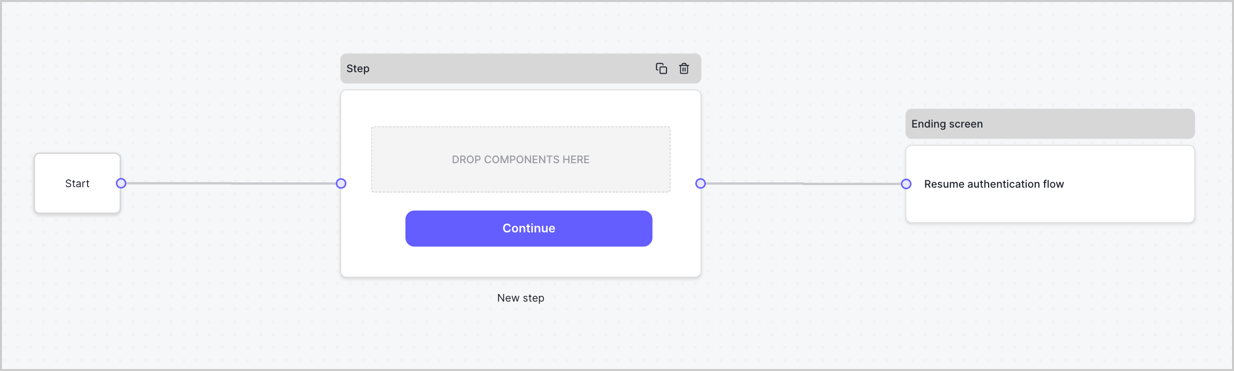
By default, a new form contains a Start node, a Step node, and an Ending screen node.
<Frame>
  <img src="https://mintcdn.com/docs-dev-fix-nav-assets/v1tq2r5p6oBnES8s/docs/images/cdy7uua7fh8z/2TZ9jSjgEcARFpULI6hz4R/a4319a1bd482f2ee5cc23100fdb2f42c/New-form-Forms-for-action-use-case.png?fit=max&auto=format&n=v1tq2r5p6oBnES8s&q=85&s=5b8ba11714bb03267752cbfdc9ee44db" alt="Dashboard > Forms > Use Cases > Form" data-og-width="1234" width="1234" data-og-height="371" height="371" data-path="docs/images/cdy7uua7fh8z/2TZ9jSjgEcARFpULI6hz4R/a4319a1bd482f2ee5cc23100fdb2f42c/New-form-Forms-for-action-use-case.png" data-optimize="true" data-opv="3" srcset="https://mintcdn.com/docs-dev-fix-nav-assets/v1tq2r5p6oBnES8s/docs/images/cdy7uua7fh8z/2TZ9jSjgEcARFpULI6hz4R/a4319a1bd482f2ee5cc23100fdb2f42c/New-form-Forms-for-action-use-case.png?w=280&fit=max&auto=format&n=v1tq2r5p6oBnES8s&q=85&s=32d251e062befc886a13392045d7c323 280w, https://mintcdn.com/docs-dev-fix-nav-assets/v1tq2r5p6oBnES8s/docs/images/cdy7uua7fh8z/2TZ9jSjgEcARFpULI6hz4R/a4319a1bd482f2ee5cc23100fdb2f42c/New-form-Forms-for-action-use-case.png?w=560&fit=max&auto=format&n=v1tq2r5p6oBnES8s&q=85&s=00f153d089194cd6fffba1847126e25f 560w, https://mintcdn.com/docs-dev-fix-nav-assets/v1tq2r5p6oBnES8s/docs/images/cdy7uua7fh8z/2TZ9jSjgEcARFpULI6hz4R/a4319a1bd482f2ee5cc23100fdb2f42c/New-form-Forms-for-action-use-case.png?w=840&fit=max&auto=format&n=v1tq2r5p6oBnES8s&q=85&s=1e23affc01f99a67512543631decdb8a 840w, https://mintcdn.com/docs-dev-fix-nav-assets/v1tq2r5p6oBnES8s/docs/images/cdy7uua7fh8z/2TZ9jSjgEcARFpULI6hz4R/a4319a1bd482f2ee5cc23100fdb2f42c/New-form-Forms-for-action-use-case.png?w=1100&fit=max&auto=format&n=v1tq2r5p6oBnES8s&q=85&s=f36209156a651ffab529c58f99572a29 1100w, https://mintcdn.com/docs-dev-fix-nav-assets/v1tq2r5p6oBnES8s/docs/images/cdy7uua7fh8z/2TZ9jSjgEcARFpULI6hz4R/a4319a1bd482f2ee5cc23100fdb2f42c/New-form-Forms-for-action-use-case.png?w=1650&fit=max&auto=format&n=v1tq2r5p6oBnES8s&q=85&s=14fe562123fbf3715da3905b76a4c809 1650w, https://mintcdn.com/docs-dev-fix-nav-assets/v1tq2r5p6oBnES8s/docs/images/cdy7uua7fh8z/2TZ9jSjgEcARFpULI6hz4R/a4319a1bd482f2ee5cc23100fdb2f42c/New-form-Forms-for-action-use-case.png?w=2500&fit=max&auto=format&n=v1tq2r5p6oBnES8s&q=85&s=2177cc6090cbade3bed718bcdf30c61b 2500w" />
</Frame>

### Configure the Step node

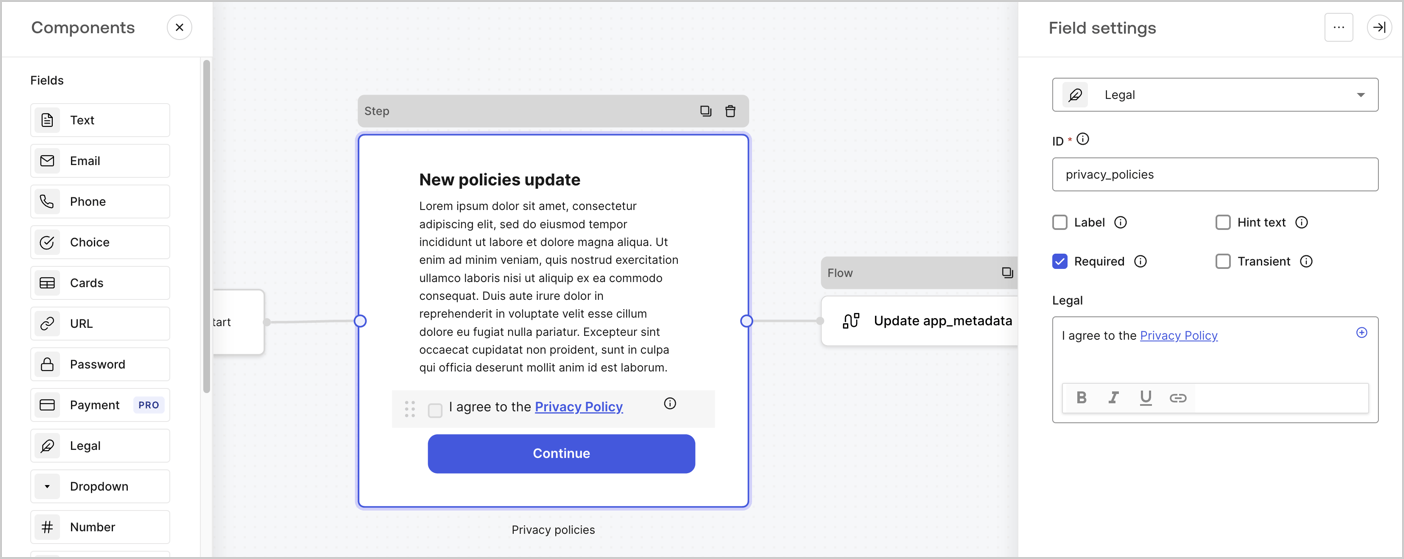
The Step node is the graphical interface visible to users. Add [Fields](/docs/customize/forms/nodes-and-components) to the Step node to collect the new agreement acceptance value by following these steps:

1. Drag a **Rich text** field from the **Components menu** into the **Step** node.

   * **Rich text**: Enter a description of your privacy policies updates.
   * Select **Save**.
2. Drag a **Legal** field into the **Step** node.

   * **ID**: Enter `privacy_policies`.
   * **Required**: Enable the checkbox.
   * **Legal**: Enter `I agree to the Privacy Policy`.
   * Select **Save**.
3. Select **Publish** to save.
<Frame>
  <img src="https://mintcdn.com/docs-dev-fix-nav-assets/Aardjr_R6padlbLI/docs/images/cdy7uua7fh8z/59zFFjQjAnjogkc2QGIqqJ/0ad66b1b636544122aa4e65968b76c2c/privacy-policy-step-node.png?fit=max&auto=format&n=Aardjr_R6padlbLI&q=85&s=715eac6fb6109a0caba6e4ba97e23c63" alt="Dashboard > Actions > Forms > Use case privacy policy step node" data-og-width="1404" width="1404" data-og-height="559" height="559" data-path="docs/images/cdy7uua7fh8z/59zFFjQjAnjogkc2QGIqqJ/0ad66b1b636544122aa4e65968b76c2c/privacy-policy-step-node.png" data-optimize="true" data-opv="3" srcset="https://mintcdn.com/docs-dev-fix-nav-assets/Aardjr_R6padlbLI/docs/images/cdy7uua7fh8z/59zFFjQjAnjogkc2QGIqqJ/0ad66b1b636544122aa4e65968b76c2c/privacy-policy-step-node.png?w=280&fit=max&auto=format&n=Aardjr_R6padlbLI&q=85&s=f24e25036dde4a1a5dda974eb672fb33 280w, https://mintcdn.com/docs-dev-fix-nav-assets/Aardjr_R6padlbLI/docs/images/cdy7uua7fh8z/59zFFjQjAnjogkc2QGIqqJ/0ad66b1b636544122aa4e65968b76c2c/privacy-policy-step-node.png?w=560&fit=max&auto=format&n=Aardjr_R6padlbLI&q=85&s=67ab38aa805fa1d4c205778b7851292f 560w, https://mintcdn.com/docs-dev-fix-nav-assets/Aardjr_R6padlbLI/docs/images/cdy7uua7fh8z/59zFFjQjAnjogkc2QGIqqJ/0ad66b1b636544122aa4e65968b76c2c/privacy-policy-step-node.png?w=840&fit=max&auto=format&n=Aardjr_R6padlbLI&q=85&s=5cb30c35476354f5447b813638716edf 840w, https://mintcdn.com/docs-dev-fix-nav-assets/Aardjr_R6padlbLI/docs/images/cdy7uua7fh8z/59zFFjQjAnjogkc2QGIqqJ/0ad66b1b636544122aa4e65968b76c2c/privacy-policy-step-node.png?w=1100&fit=max&auto=format&n=Aardjr_R6padlbLI&q=85&s=2796e0bac00d30de454d7f72eafe7fe3 1100w, https://mintcdn.com/docs-dev-fix-nav-assets/Aardjr_R6padlbLI/docs/images/cdy7uua7fh8z/59zFFjQjAnjogkc2QGIqqJ/0ad66b1b636544122aa4e65968b76c2c/privacy-policy-step-node.png?w=1650&fit=max&auto=format&n=Aardjr_R6padlbLI&q=85&s=75dfec39e4957b354754a1e52e88bca9 1650w, https://mintcdn.com/docs-dev-fix-nav-assets/Aardjr_R6padlbLI/docs/images/cdy7uua7fh8z/59zFFjQjAnjogkc2QGIqqJ/0ad66b1b636544122aa4e65968b76c2c/privacy-policy-step-node.png?w=2500&fit=max&auto=format&n=Aardjr_R6padlbLI&q=85&s=74c5a30cdd0c0bcb88c492cfa5b7ecaa 2500w" />
</Frame>

### Configure the Flow node

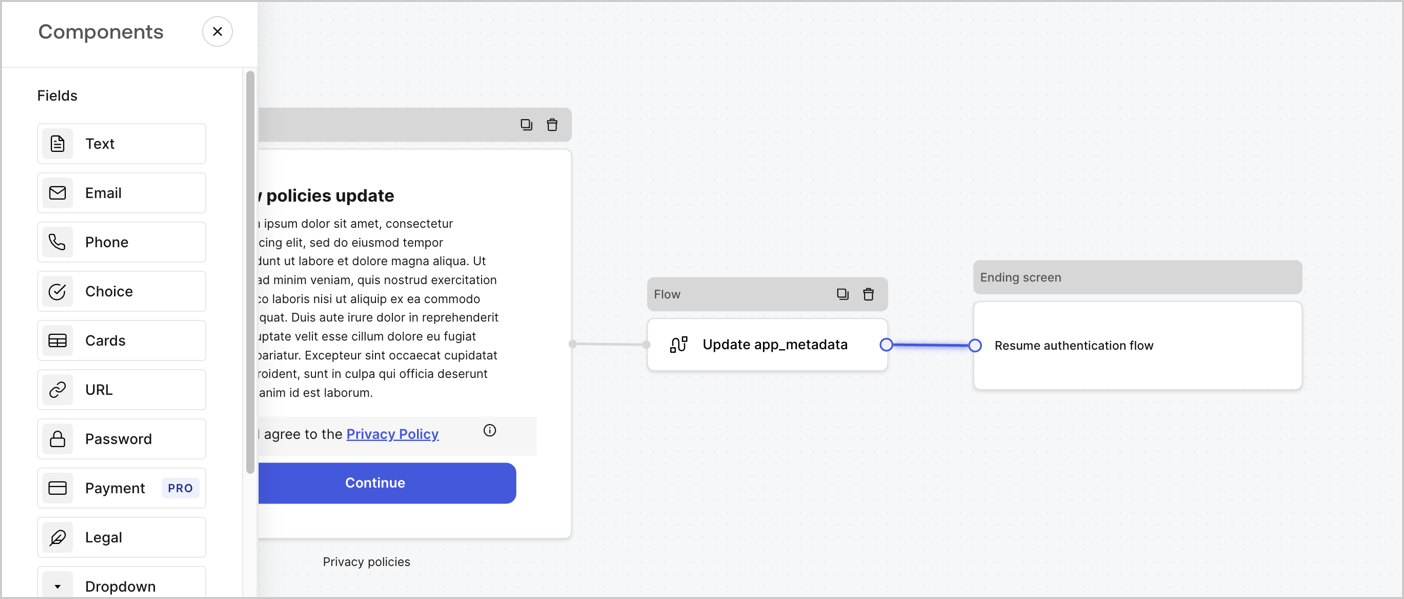
Add a **Flow** node after the **Step** node to update the `app_metadata` and resume the authentication flow by following these steps:

1. Select **Flow** from the bottom of the Form editor.
2. Remove the existing link between the **Step** and **Ending Screen** nodes.
3. Select the new **Flow** > **Click to add a flow** > **Create a new flow.**

   * Enter `Update app_metadata` in the **Name** field.
   * Select **Create**.
   * Select **Save**.
4. Link the **Flow** node to the **Step** and **Ending Screen** nodes as pictured below.
5. Select **Publish** to save.
<Frame>
  <img src="https://mintcdn.com/docs-dev-fix-nav-assets/q5Ii4EO0SSVoOxXV/docs/images/cdy7uua7fh8z/6YIkzm7SrpM9LW76AXuRzh/353c518fe82bbaa440836da1d83596d6/link-policies.png?fit=max&auto=format&n=q5Ii4EO0SSVoOxXV&q=85&s=823f82bf1070779ecca562409c44f278" alt="Dashboard > Actions > Forms > Form" data-og-width="1404" width="1404" data-og-height="599" height="599" data-path="docs/images/cdy7uua7fh8z/6YIkzm7SrpM9LW76AXuRzh/353c518fe82bbaa440836da1d83596d6/link-policies.png" data-optimize="true" data-opv="3" srcset="https://mintcdn.com/docs-dev-fix-nav-assets/q5Ii4EO0SSVoOxXV/docs/images/cdy7uua7fh8z/6YIkzm7SrpM9LW76AXuRzh/353c518fe82bbaa440836da1d83596d6/link-policies.png?w=280&fit=max&auto=format&n=q5Ii4EO0SSVoOxXV&q=85&s=eac69e17460d8ca517fe4127c98462e8 280w, https://mintcdn.com/docs-dev-fix-nav-assets/q5Ii4EO0SSVoOxXV/docs/images/cdy7uua7fh8z/6YIkzm7SrpM9LW76AXuRzh/353c518fe82bbaa440836da1d83596d6/link-policies.png?w=560&fit=max&auto=format&n=q5Ii4EO0SSVoOxXV&q=85&s=69080d025cebd7f09001ce68bae70cfb 560w, https://mintcdn.com/docs-dev-fix-nav-assets/q5Ii4EO0SSVoOxXV/docs/images/cdy7uua7fh8z/6YIkzm7SrpM9LW76AXuRzh/353c518fe82bbaa440836da1d83596d6/link-policies.png?w=840&fit=max&auto=format&n=q5Ii4EO0SSVoOxXV&q=85&s=03e55b5b42b0c070fb28862481cfebb2 840w, https://mintcdn.com/docs-dev-fix-nav-assets/q5Ii4EO0SSVoOxXV/docs/images/cdy7uua7fh8z/6YIkzm7SrpM9LW76AXuRzh/353c518fe82bbaa440836da1d83596d6/link-policies.png?w=1100&fit=max&auto=format&n=q5Ii4EO0SSVoOxXV&q=85&s=46e706d3a855426cf5418eec8f3b717f 1100w, https://mintcdn.com/docs-dev-fix-nav-assets/q5Ii4EO0SSVoOxXV/docs/images/cdy7uua7fh8z/6YIkzm7SrpM9LW76AXuRzh/353c518fe82bbaa440836da1d83596d6/link-policies.png?w=1650&fit=max&auto=format&n=q5Ii4EO0SSVoOxXV&q=85&s=e49267eb4161d1248670bdfdb5c3b23e 1650w, https://mintcdn.com/docs-dev-fix-nav-assets/q5Ii4EO0SSVoOxXV/docs/images/cdy7uua7fh8z/6YIkzm7SrpM9LW76AXuRzh/353c518fe82bbaa440836da1d83596d6/link-policies.png?w=2500&fit=max&auto=format&n=q5Ii4EO0SSVoOxXV&q=85&s=56af28efa4ae2c9d8ba1117ab783f4bb 2500w" />
</Frame>

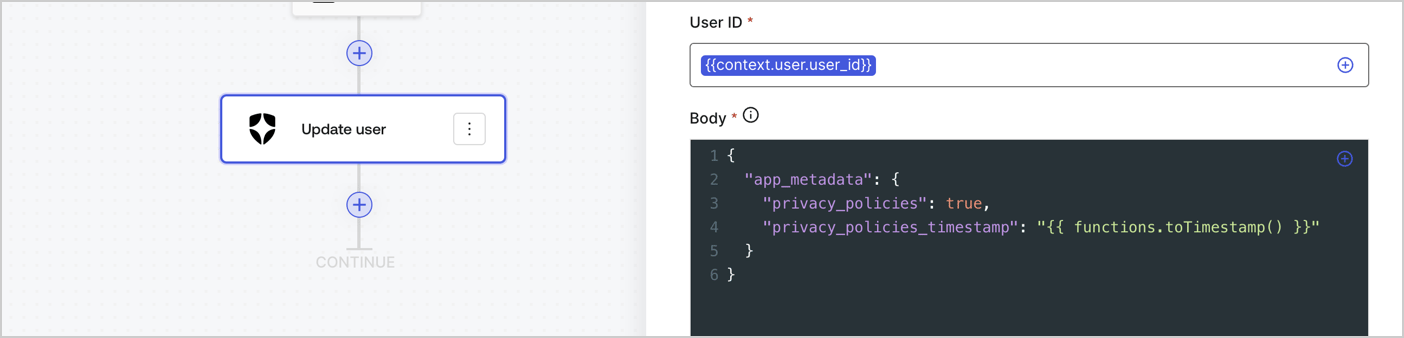
Add an Auth0 Update user action to the flow by following these steps:

1. Select the **Flow** **Update app\_metadata** > **Edit flow** to open the Flow editor in a new tab.
2. Below the StartAction, select the **+** icon to add an **Update user** action. Complete the fields below, then select **Save** to continue.

   * **Connection**: Select from the dropdown the Vault connection to your M2M application.

   * **User ID**: Enter `{{context.user.user_id}}`.

   * **Body**: Copy and paste the following code to update the app\_metadata with the privacy\_policies and privacy\_policies\_timestamp properties.

     ```text lines theme={null}
     {
       "app_metadata": {
         "privacy_policies": true,
         "privacy_policies_timestamp": "{{ functions.toTimestamp() }}"
       }
     }
     ```

   * Select **Save**.
3. Select **Publish** to save.
<Frame>
  <img src="https://mintcdn.com/docs-dev-fix-nav-assets/KJQc5TLemlolR1Fd/docs/images/cdy7uua7fh8z/CvMNIwWrOUwaFW4X3G28p/1fb70ae57a20749d9ffaaba8dc0b7e26/update-user-privacy.png?fit=max&auto=format&n=KJQc5TLemlolR1Fd&q=85&s=f9c02bb7253387cdf5dd167db186c846" alt="Dashboard > Actions > Forms > User case privacy policy code" data-og-width="1404" width="1404" data-og-height="338" height="338" data-path="docs/images/cdy7uua7fh8z/CvMNIwWrOUwaFW4X3G28p/1fb70ae57a20749d9ffaaba8dc0b7e26/update-user-privacy.png" data-optimize="true" data-opv="3" srcset="https://mintcdn.com/docs-dev-fix-nav-assets/KJQc5TLemlolR1Fd/docs/images/cdy7uua7fh8z/CvMNIwWrOUwaFW4X3G28p/1fb70ae57a20749d9ffaaba8dc0b7e26/update-user-privacy.png?w=280&fit=max&auto=format&n=KJQc5TLemlolR1Fd&q=85&s=f654495bb3907de535fc69a74aaafe9f 280w, https://mintcdn.com/docs-dev-fix-nav-assets/KJQc5TLemlolR1Fd/docs/images/cdy7uua7fh8z/CvMNIwWrOUwaFW4X3G28p/1fb70ae57a20749d9ffaaba8dc0b7e26/update-user-privacy.png?w=560&fit=max&auto=format&n=KJQc5TLemlolR1Fd&q=85&s=4a5145b00f9e9967cfebce08edf504a8 560w, https://mintcdn.com/docs-dev-fix-nav-assets/KJQc5TLemlolR1Fd/docs/images/cdy7uua7fh8z/CvMNIwWrOUwaFW4X3G28p/1fb70ae57a20749d9ffaaba8dc0b7e26/update-user-privacy.png?w=840&fit=max&auto=format&n=KJQc5TLemlolR1Fd&q=85&s=42797e70d1242c7d6571f44fd591858f 840w, https://mintcdn.com/docs-dev-fix-nav-assets/KJQc5TLemlolR1Fd/docs/images/cdy7uua7fh8z/CvMNIwWrOUwaFW4X3G28p/1fb70ae57a20749d9ffaaba8dc0b7e26/update-user-privacy.png?w=1100&fit=max&auto=format&n=KJQc5TLemlolR1Fd&q=85&s=4cd2c72f9d6d8de653f97ad29cc861e7 1100w, https://mintcdn.com/docs-dev-fix-nav-assets/KJQc5TLemlolR1Fd/docs/images/cdy7uua7fh8z/CvMNIwWrOUwaFW4X3G28p/1fb70ae57a20749d9ffaaba8dc0b7e26/update-user-privacy.png?w=1650&fit=max&auto=format&n=KJQc5TLemlolR1Fd&q=85&s=78f2e10456ebef98ac42aebe2c98783c 1650w, https://mintcdn.com/docs-dev-fix-nav-assets/KJQc5TLemlolR1Fd/docs/images/cdy7uua7fh8z/CvMNIwWrOUwaFW4X3G28p/1fb70ae57a20749d9ffaaba8dc0b7e26/update-user-privacy.png?w=2500&fit=max&auto=format&n=KJQc5TLemlolR1Fd&q=85&s=f66d74d3451e82d5679bd8df2c06ce12 2500w" />
</Frame>

<Callout icon="file-lines" color="#0EA5E9" iconType="regular">
  The flow **Update app\_metadata** adds a `privacy_policies true` value to the app`_metadata` object and also generates a timestamp with a [helper function.](/docs/customize/forms/variables)
</Callout>

## Retrieve the form render code

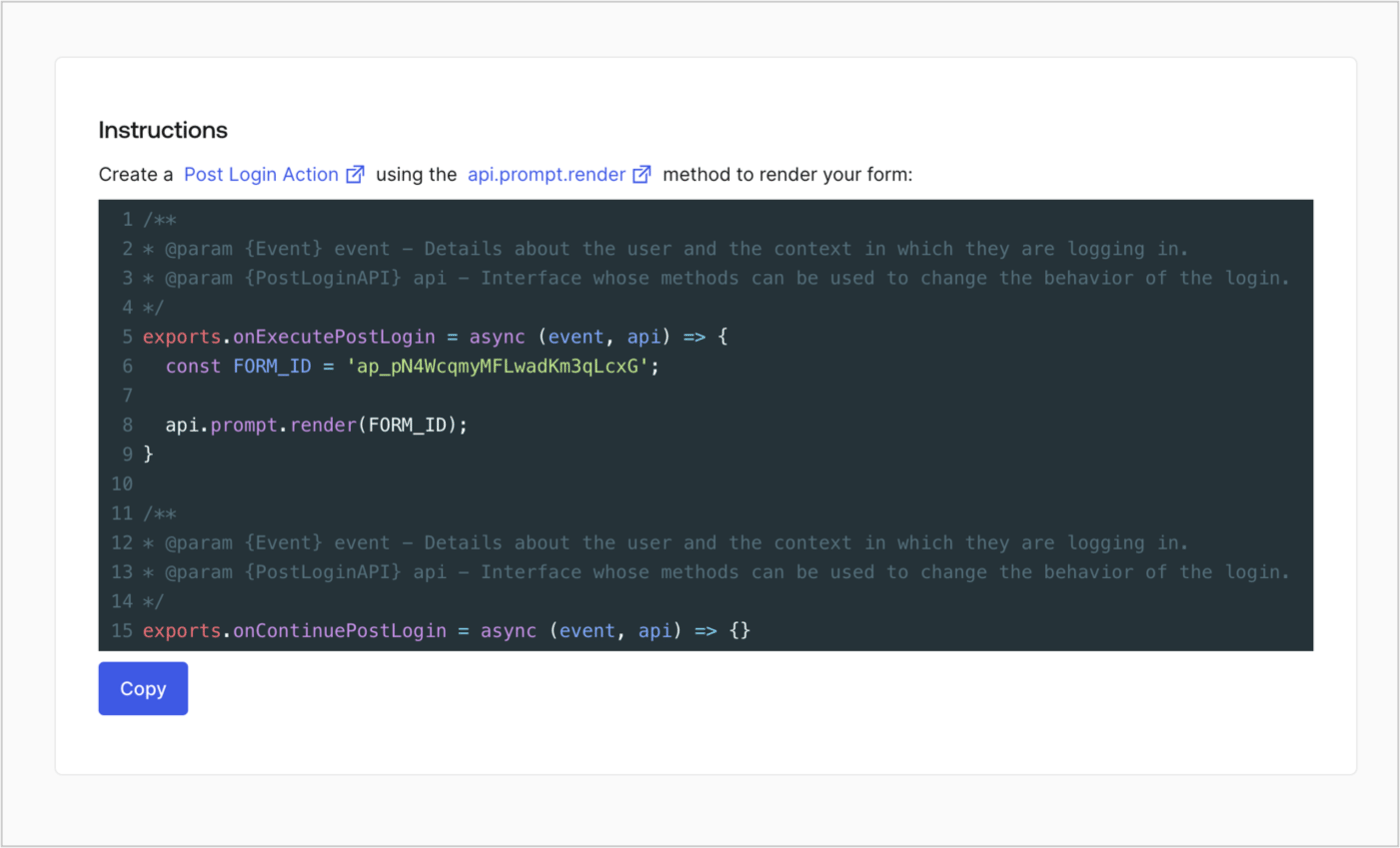
Retrieve your form render code to visually render the form with a custom Post Login Action by following these steps:

* From the Form editor, select **`<> Render`**.
* Select **Copy**.
<Frame>
  <img src="https://mintcdn.com/docs-dev-fix-nav-assets/HYP2A2HqhvrkOXXE/docs/images/cdy7uua7fh8z/2EIUzc539sq9lwoTKbjoJv/496a864c0fc44a782c9cadca119dbfb0/embed.png?fit=max&auto=format&n=HYP2A2HqhvrkOXXE&q=85&s=f102d1cac6050e31518f061e7927dd0a" alt="Dashboard > Actions > Forms > Form > Embed" data-og-width="1400" width="1400" data-og-height="848" height="848" data-path="docs/images/cdy7uua7fh8z/2EIUzc539sq9lwoTKbjoJv/496a864c0fc44a782c9cadca119dbfb0/embed.png" data-optimize="true" data-opv="3" srcset="https://mintcdn.com/docs-dev-fix-nav-assets/HYP2A2HqhvrkOXXE/docs/images/cdy7uua7fh8z/2EIUzc539sq9lwoTKbjoJv/496a864c0fc44a782c9cadca119dbfb0/embed.png?w=280&fit=max&auto=format&n=HYP2A2HqhvrkOXXE&q=85&s=2353b577f44017ef5f7d0e0203dc1887 280w, https://mintcdn.com/docs-dev-fix-nav-assets/HYP2A2HqhvrkOXXE/docs/images/cdy7uua7fh8z/2EIUzc539sq9lwoTKbjoJv/496a864c0fc44a782c9cadca119dbfb0/embed.png?w=560&fit=max&auto=format&n=HYP2A2HqhvrkOXXE&q=85&s=3bea26ac9ea6e667a2448b4dcf0cfe14 560w, https://mintcdn.com/docs-dev-fix-nav-assets/HYP2A2HqhvrkOXXE/docs/images/cdy7uua7fh8z/2EIUzc539sq9lwoTKbjoJv/496a864c0fc44a782c9cadca119dbfb0/embed.png?w=840&fit=max&auto=format&n=HYP2A2HqhvrkOXXE&q=85&s=192d0b73c30fa04c07560ed733c573a8 840w, https://mintcdn.com/docs-dev-fix-nav-assets/HYP2A2HqhvrkOXXE/docs/images/cdy7uua7fh8z/2EIUzc539sq9lwoTKbjoJv/496a864c0fc44a782c9cadca119dbfb0/embed.png?w=1100&fit=max&auto=format&n=HYP2A2HqhvrkOXXE&q=85&s=b4a9ab90db7897450fee72b07a290b89 1100w, https://mintcdn.com/docs-dev-fix-nav-assets/HYP2A2HqhvrkOXXE/docs/images/cdy7uua7fh8z/2EIUzc539sq9lwoTKbjoJv/496a864c0fc44a782c9cadca119dbfb0/embed.png?w=1650&fit=max&auto=format&n=HYP2A2HqhvrkOXXE&q=85&s=96bf369e3871e6fe50f630ef6388944d 1650w, https://mintcdn.com/docs-dev-fix-nav-assets/HYP2A2HqhvrkOXXE/docs/images/cdy7uua7fh8z/2EIUzc539sq9lwoTKbjoJv/496a864c0fc44a782c9cadca119dbfb0/embed.png?w=2500&fit=max&auto=format&n=HYP2A2HqhvrkOXXE&q=85&s=f80df7299842841267be0a74abbdd0c2 2500w" />
</Frame>

## Create a Post Login Action

Create a post-login Action to render your form by following these steps:

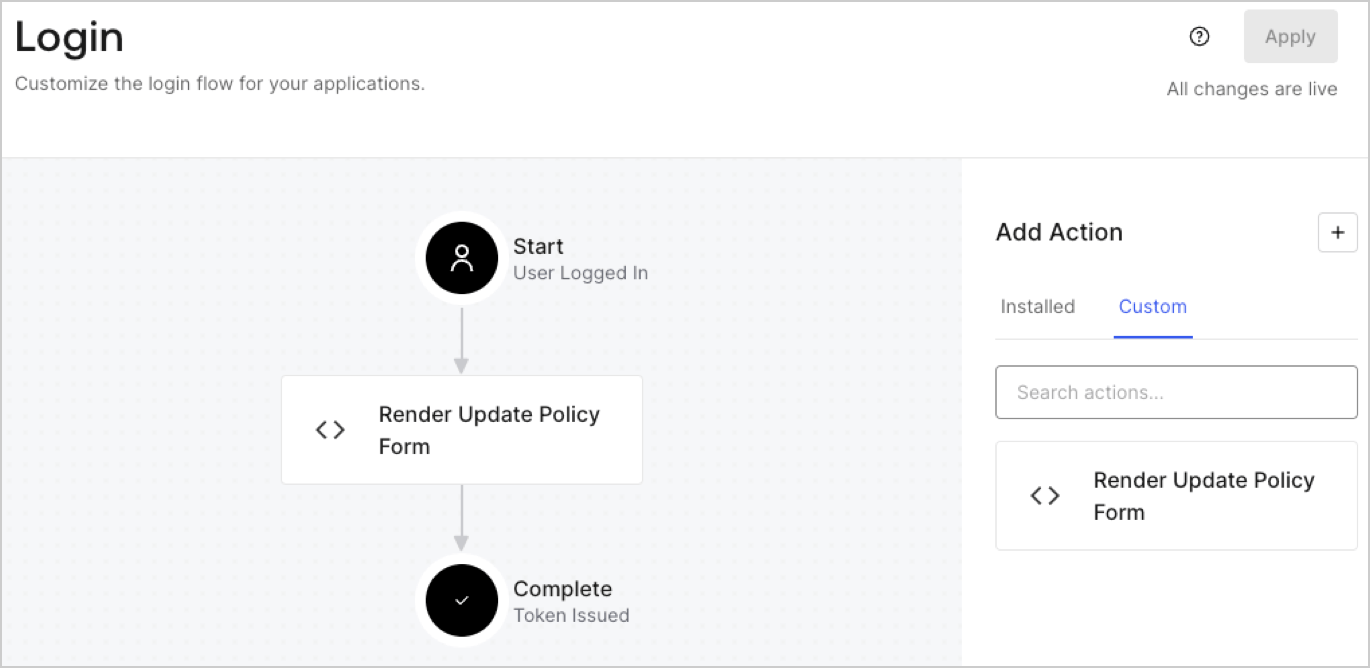
1. Navigate to **Auth0 Dashboard > Actions > Flows > Login.**
2. Select the **+** icon and Select **Build from scratch**:

   * **Name**: Enter `Render Update Policy Form`.
   * **Trigger**: Select `Login / Post Login`.
   * **Runtime**: Select the recommended version.
3. Select **Create**.

To configure the post-login Action:

1. Delete the existing code from the Code editor.
2. Paste the form render code into the Code editor.
3. Edit the code to define the conditional logic that will render the form.

   ```javascript lines theme={null}
   /**
   * @param {Event} event - Details about the user and the context in which they are logging in.
   * @param {PostLoginAPI} api - Interface whose methods can be used to change the behavior of the login.
   */
   exports.onExecutePostLogin = async (event, api) => {
     const FORM_ID = 'REPLACE_WITH_YOUR_FORM_ID';

     if (event.user.app_metadata.privacy_policies !== true) {
       api.prompt.render(FORM_ID);
     }
   }

   exports.onContinuePostLogin = async (event, api) => { }
   ```

   <Callout icon="file-lines" color="#0EA5E9" iconType="regular">
     The example code above will render the form when a user is missing the app metadata `privacy_policies` property.
   </Callout>
4. Select **Deploy.**
5. Drag and Drop the **Render Update Policy Form** Action to the **Login** flow.
   <Frame>
     <img src="https://mintcdn.com/docs-dev-fix-nav-assets/su-_e2cujGlTsDmd/docs/images/cdy7uua7fh8z/5TOwDgevZsBqd7yZynUYWU/41ca909dc3007aed4f40ff794a05efa5/postlogin.png?fit=max&auto=format&n=su-_e2cujGlTsDmd&q=85&s=f1151139d5ff367e83538b35d75fb40d" alt="Dashboard > Forms > Use Case > Render update policy form login action" data-og-width="1370" width="1370" data-og-height="668" height="668" data-path="docs/images/cdy7uua7fh8z/5TOwDgevZsBqd7yZynUYWU/41ca909dc3007aed4f40ff794a05efa5/postlogin.png" data-optimize="true" data-opv="3" srcset="https://mintcdn.com/docs-dev-fix-nav-assets/su-_e2cujGlTsDmd/docs/images/cdy7uua7fh8z/5TOwDgevZsBqd7yZynUYWU/41ca909dc3007aed4f40ff794a05efa5/postlogin.png?w=280&fit=max&auto=format&n=su-_e2cujGlTsDmd&q=85&s=88d06d6e545b90c11080c6c8f591965b 280w, https://mintcdn.com/docs-dev-fix-nav-assets/su-_e2cujGlTsDmd/docs/images/cdy7uua7fh8z/5TOwDgevZsBqd7yZynUYWU/41ca909dc3007aed4f40ff794a05efa5/postlogin.png?w=560&fit=max&auto=format&n=su-_e2cujGlTsDmd&q=85&s=944c1e94489b668637a6877a7d2abd17 560w, https://mintcdn.com/docs-dev-fix-nav-assets/su-_e2cujGlTsDmd/docs/images/cdy7uua7fh8z/5TOwDgevZsBqd7yZynUYWU/41ca909dc3007aed4f40ff794a05efa5/postlogin.png?w=840&fit=max&auto=format&n=su-_e2cujGlTsDmd&q=85&s=32d293bf981243a3e1f21d82f1ced3ce 840w, https://mintcdn.com/docs-dev-fix-nav-assets/su-_e2cujGlTsDmd/docs/images/cdy7uua7fh8z/5TOwDgevZsBqd7yZynUYWU/41ca909dc3007aed4f40ff794a05efa5/postlogin.png?w=1100&fit=max&auto=format&n=su-_e2cujGlTsDmd&q=85&s=2728ec684bc4344c1591b2c9be288486 1100w, https://mintcdn.com/docs-dev-fix-nav-assets/su-_e2cujGlTsDmd/docs/images/cdy7uua7fh8z/5TOwDgevZsBqd7yZynUYWU/41ca909dc3007aed4f40ff794a05efa5/postlogin.png?w=1650&fit=max&auto=format&n=su-_e2cujGlTsDmd&q=85&s=734d3fb425c8cad3065d678d89f02e7d 1650w, https://mintcdn.com/docs-dev-fix-nav-assets/su-_e2cujGlTsDmd/docs/images/cdy7uua7fh8z/5TOwDgevZsBqd7yZynUYWU/41ca909dc3007aed4f40ff794a05efa5/postlogin.png?w=2500&fit=max&auto=format&n=su-_e2cujGlTsDmd&q=85&s=2af2d40aa1f8eb4229544d7224648d8d 2500w" />
   </Frame>
6. Select **Apply.**

### Test implementation

Test the implementation by following these steps:

1. Log in with an existing user whose app`_metadata` attribute `privacy_policies` does not have a value.
2. The post-login Action in the Login flow will render the form and prompt for acceptance.
3. Select **Auth0 Dashboard > User Management > Users,** locate the user and verify that the `app_metadata` attribute `privacy_policies` contains a `true` value and a timestamp.
